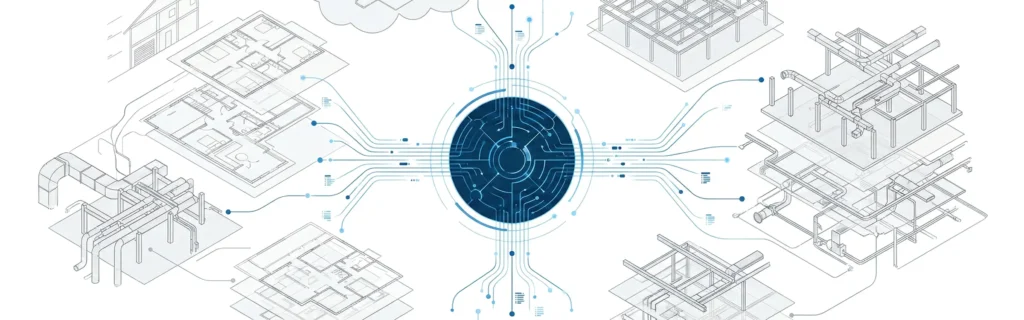

Define Building Information Modeling Software
What is BIM software? BIM software is a set of digital tools used to create and manage a digital representation of a built asset-combining geometry with building information like materials, quantities, specifications, and functional data. This approach is part of building information modeling bim, where the model becomes a shared reference for architecture engineering and construction teams.
BIM stands for more than 3D
Many people think BIM is “3D modeling,” but BIM stands for a process and a data mindset. The software supports a bim process where project teams build, review, and share information through the project lifecycle. That’s why BIM is tied to digital transformation in the AEC industry-it changes how information moves through design and delivery.
Digital representation and building information
A BIM model isn’t just shapes. It’s information modeling that captures building information: elements, properties, and relationships that describe how a building or infrastructure asset is designed, built, and operated. You’ll also see BIM described as a building description system because it organizes data about spaces, systems, and components in a structured way.For a broader definition of BIM in delivery, see what Is BIM in construction.
Explain BIM Software in Simple Terms
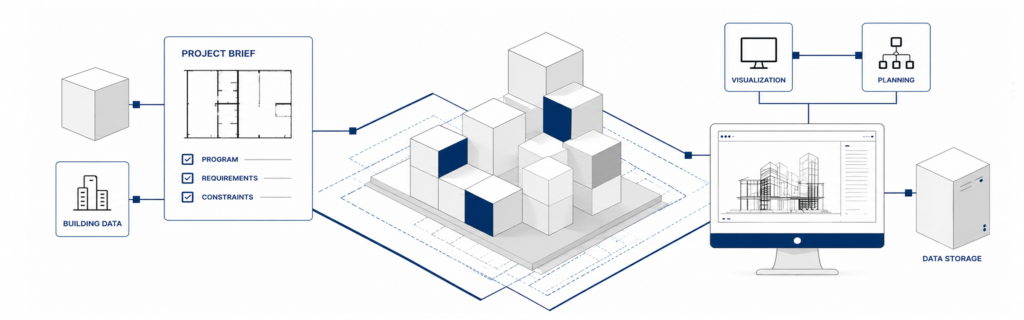
In simple terms, bim software helps teams plan and deliver building projects by keeping design data, model data, and documentation connected. Instead of every team working from separate files, BIM tools support a shared environment where updates are coordinated.
One shared knowledge resource for project teams
Think of BIM as a shared knowledge resource. When project teams agree on standards, the BIM model becomes a reliable reference for design, coordination, and decision-making. That helps reduce confusion across the parties involved-especially when multiple disciplines contribute to the same building systems.
From conceptual design to construction sites
BIM tools can be used from early conceptual design through detailed design and into construction sites. As the model develops, it supports both design and construction needs: drawings, schedules, quantities, coordination views, and issue tracking. Done well, this supports better handoffs as construction begins and construction progress ramps up.If you want a high-level “how it works” view, how does BIM work is a good next read.
What Is BIM Software Used For
BIM software is used for managing design data and turning it into coordinated deliverables that guide the construction process and long-term operations.
Design and construction intent in one place
A common reason teams adopt BIM is to connect design and construction intent. The model captures architectural design intent and ties it to constructability, sequencing, and coordination decisions. This can reduce late changes and improve project outcomes across construction projects.
Construction planning, construction sequencing, and construction management
Beyond design, BIM supports:
- Construction planning (site logistics, access, trade coordination)
- Construction sequencing (linking model elements to install order and schedule thinking)
- Construction management workflows (issue tracking, approvals, and handoffs)
These uses matter most when the model supports real decisions-before construction begins and throughout the construction industry’s delivery timeline.
Key Features of BIM Software
Not all BIM tools do the same thing. But most BIM software supports a core set of capabilities that enable BIM workflows.
Information modeling, digital models, and a master model mindset
BIM software supports digital models that represent geometry plus information. In mature teams, there’s often a “master model” mindset: a controlled, coordinated source of truth that evolves through the project lifecycle. This helps project managers and design leads manage change without losing context.
Key features often include:
- Parametric objects and relationships
- Data fields for functional characteristics
- Reporting from model data for schedules and quantities
- Tools to align the model with construction intent
Document management and common data environment
Real projects need structure. BIM tools often include document management and integration with a common data environment (CDE), where drawings, RFIs, submittals, and model versions can be controlled. This supports project management and reduces errors when multiple teams are working in parallel.
Real time collaboration across parties involved
Many BIM ecosystems support real time collaboration and review workflows, sometimes optimized for mobile devices so teams can reference current information on site. This matters when field teams need access to the right model views and documents at construction sites.
Difference Between BIM and CAD Software
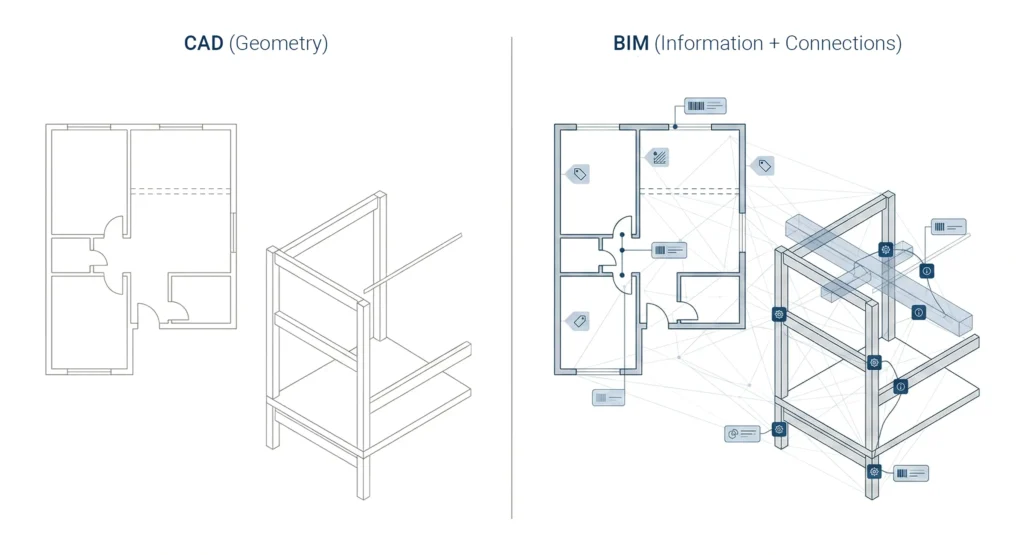
The difference is not just “3D vs 2D.” It’s information vs lines.
Traditional CAD approaches vs information modeling
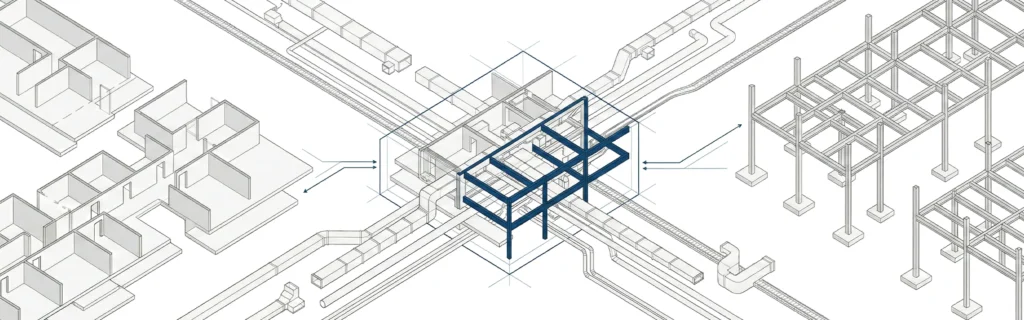
Traditional CAD approaches focus on drafting geometry-lines, arcs, and shapes. BIM focuses on information modeling: objects that know what they are (walls, doors, beams), plus their properties and relationships. That’s why BIM supports richer building information and better coordination across different disciplines.
Why BIM workflows change project outcomes
Because BIM ties information to model elements, BIM workflows can support coordination, quantity review, cost analysis, and planning. That can improve project outcomes by reducing missing scope, misalignment between teams, and late-stage redesign.
Top BIM Software Examples
When people ask what is the best bim software or which bim software is the most popular, the honest answer is: it depends on your discipline, project type, and workflow needs.
BIM authoring tools, coordination tools, and CDE platforms
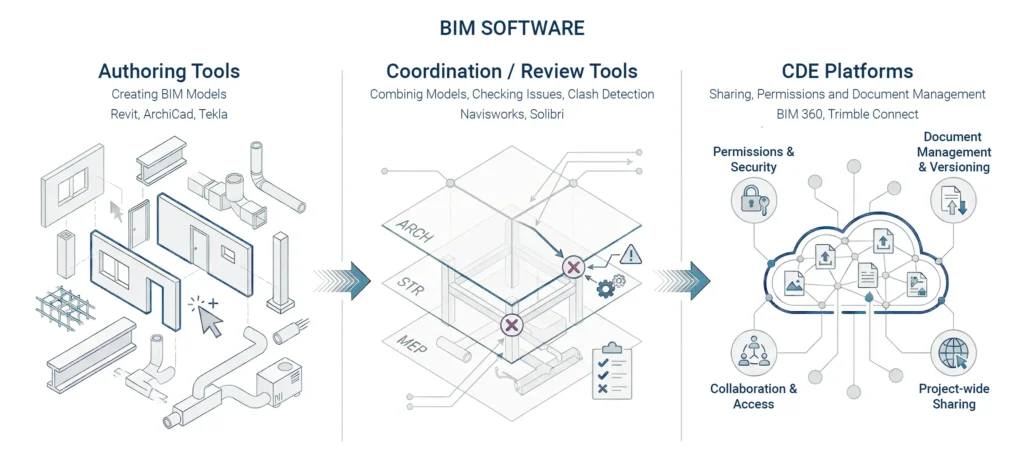
Most BIM ecosystems include three categories:
- BIM authoring tools for creating the BIM model (architecture, structure, MEP)
- Coordination/review tools for combining models and checking issues
- CDE platforms for sharing, permissions, and document management
On complex construction projects, these tools work together to support the overall bim process. For a file-focused angle, what is a bim file can help explain how models are packaged and exchanged.
Industry Foundation Classes and interoperability
Interoperability matters when different companies use different tools. Industry foundation classes (IFC) is a common standard for exchanging model data between platforms. This helps project teams share information without locking everyone into one vendor toolset-especially for infrastructure projects and large infrastructure projects.
BIM Software for Architects
For architects, BIM software supports both design quality and delivery reliability.
Architectural design, visualization capabilities, and conceptual design
Architects often use BIM for architectural design, early conceptual design, and communicating intent through views, schedules, and model-based documentation. BIM also supports visualization capabilities for design reviews, stakeholder presentations, and internal coordination.
How architectural firms use BIM data
Many architectural firms rely on BIM data to keep drawings, schedules, and model elements coordinated. When changes happen, a well-structured model updates related views more consistently than separate drafting files. That supports better project outcomes and helps teams control project costs by reducing rework and coordination gaps.For an architecture-specific definition, see what is BIM in architecture.
Benefits of Using BIM
BIM adoption is driven by outcomes: fewer surprises, better coordination, and improved lifecycle thinking.
Better project outcomes and cost analysis
BIM can improve project outcomes by enabling earlier coordination and clearer decision-making. Teams use model data for cost analysis, quantity review, and planning-helping reduce project costs and lower the risk of late changes when construction begins.
Support operations, asset management, and life cycle planning
BIM is also valuable after handover. When information is structured, it can support operations and long-term asset management. This connects BIM to facility management and building management workflows, where facilities managers need reliable data about systems, spaces, and maintenance requirements across the life cycle of a built asset.
Who Uses BIM Software
BIM is a team sport. Different roles use the model differently, but everyone benefits from reliable information.
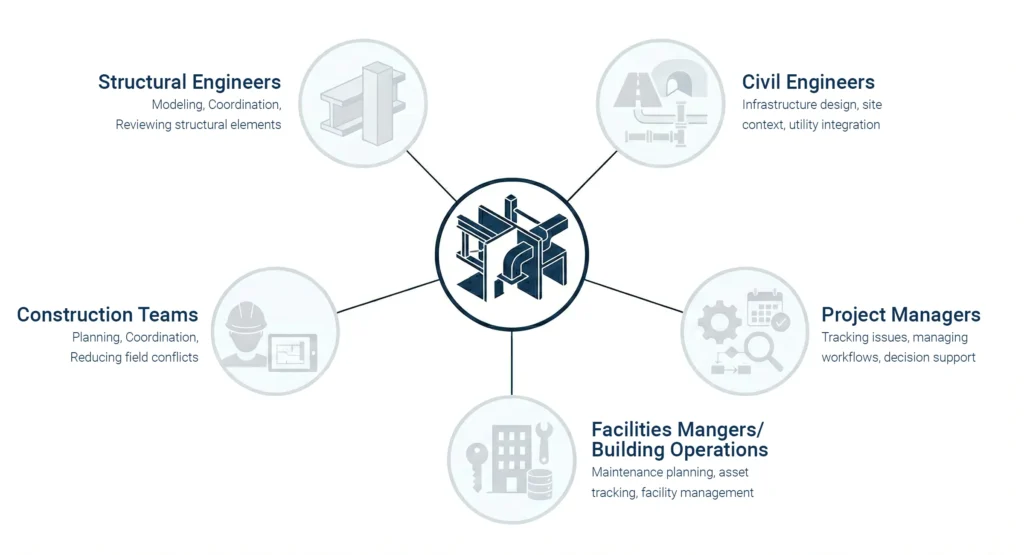
Structural engineers, civil engineers, and construction teams
Structural engineers use BIM for structural modeling, coordination with architecture and MEP, and reviewing structural elements in context. Civil engineers may use BIM for infrastructure design, site context, and integration with terrain and utility data-especially in infrastructure projects. Construction teams use BIM for planning, coordination, and reducing field conflicts.
Project managers, facilities managers, and building management
Project managers use BIM outputs to support project management decisions, track issues, and manage information flow. Facilities managers and operations teams use BIM data for maintenance planning, asset tracking, and facility management-especially when the model is delivered with consistent data requirements.
What Is Autodesk Revit
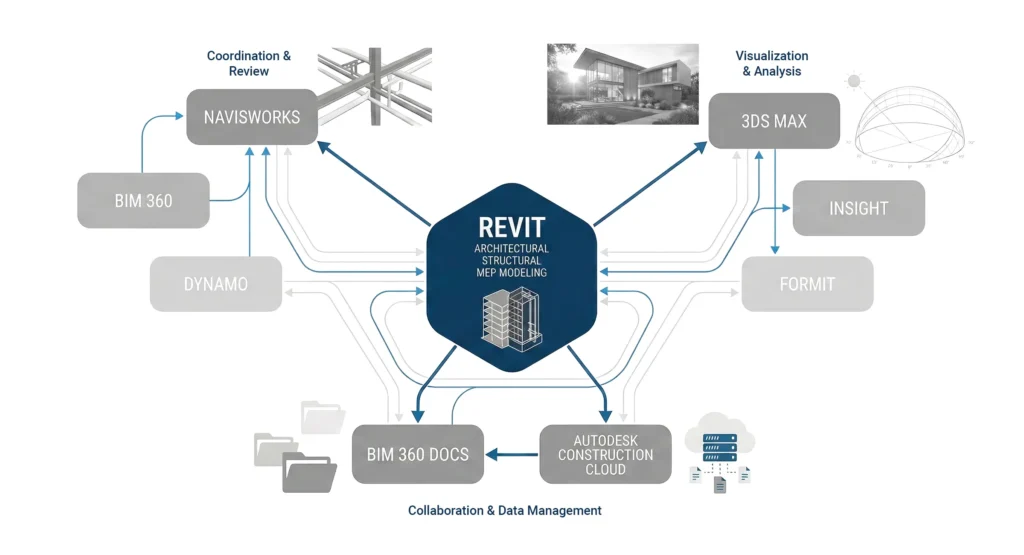
What is Autodesk Revit? Revit is one of the most widely used BIM authoring tools, especially for architecture, structural, and MEP modeling.
What Revit is best known for
Revit is known for parametric modeling, coordinated views, schedules, and discipline-based workflows that keep documentation connected to the BIM model. It’s commonly used to build and maintain model geometry and information through design and documentation.
Where it fits in a BIM ecosystem
Revit is usually one part of a larger bim ecosystem. Project teams often pair it with coordination tools, reality capture workflows, and a common data environment to manage reviews and handoffs. In many construction projects, Revit supports authoring while other tools support coordination, document management, and site collaboration.For collaboration platform context, see what is bim 360 .
How to Learn BIM for Beginners
BIM learning is most effective when you connect software skills to real workflow steps.
Skills to learn first in the BIM process
Beginner focus areas:
- Core concepts of building information modeling
- Model organization (levels, grids, naming, families/objects)
- Basic coordination habits (links, version control, clean exports)
- Reading model outputs and understanding construction intent
- Collaboration basics and documentation discipline
This helps you understand BIM tools in the context of the full bim process, not just isolated modeling.
BIM adoption, BIM implementation, and practical practice projects
BIM adoption inside companies often succeeds when there’s a simple implementation plan, clear standards, and small pilot projects. BIM implementation doesn’t need to be complicated-start with a few workflows, create templates, and refine them based on real results. Practice with building projects that mirror real constraints (tight MEP zones, coordination interfaces, and documentation needs).
BIM vs VDC
BIM and VDC are related, but they aren’t identical terms.
Where VDC fits in modern construction
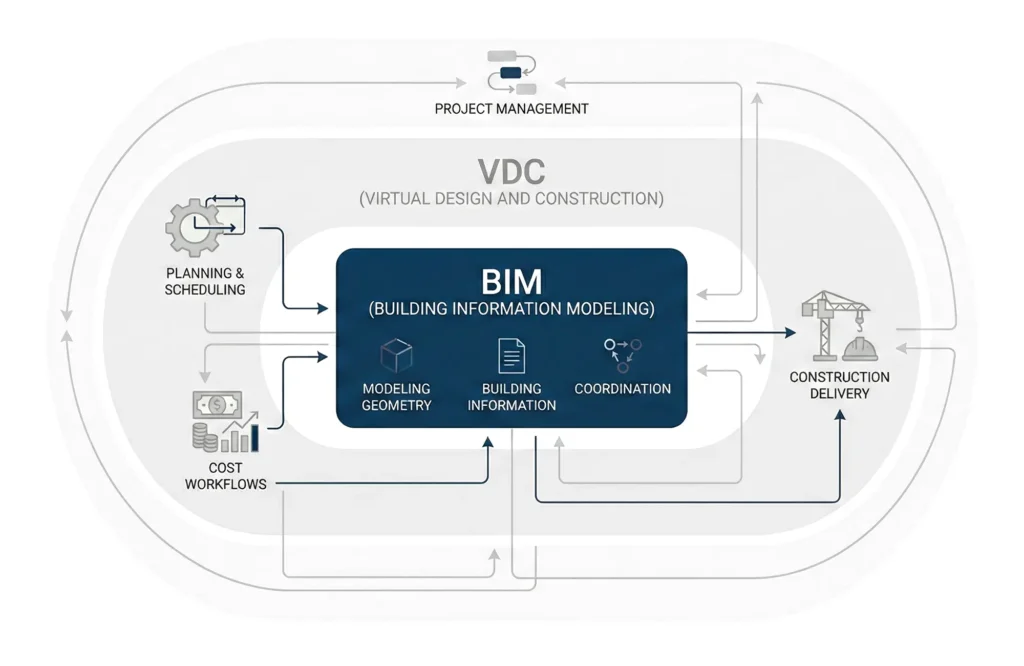
VDC (Virtual Design and Construction) is often used to describe the broader process of using digital methods to plan, coordinate, and deliver projects. BIM is a major foundation for VDC, but VDC can also include scheduling, cost workflows, and construction planning processes that extend beyond modeling.
Connecting BIM workflows to project management
BIM workflows support project management when model information is structured and shared consistently. That includes coordination, issue tracking, and decision records-helping teams align design and construction intent and improve project outcomes.If your team is evaluating the right BIM software stack or setting up practical BIM workflows for real projects, MastTeam can help you define standards and a workable process. You can contact us.
FAQ
What is BIM software in construction?
It’s software used to create and manage a BIM model and related building information so construction projects can be planned, coordinated, and delivered with fewer conflicts.
What is the best BIM software?
The best BIM software depends on your discipline, project type, and collaboration needs. Many teams combine authoring tools with coordination and common data environment platforms.
Which BIM software is the most popular?
In many US project environments, Autodesk tools (including Revit) are widely used, but popularity varies by sector and project requirements.
Is BIM software only for architects?
No. Structural engineers, MEP teams, civil engineers, construction teams, and project managers all use BIM tools and BIM data in different ways.
How is BIM different from CAD software?
CAD focuses on drafting geometry. BIM focuses on information modeling-objects with data and relationships that support design, coordination, and lifecycle workflows.
Can BIM support facility management after handover?
Yes. If BIM data is structured well, it can support facility management, asset management, and building management across the life cycle of a built asset.